
See what's new on Attndly this August
Group tickets are here. Sell a Table of 8 with one check-in code, plus smarter availability checks that prevent overselling, payout protections, and a rounder of polish across the app. Here's everything we shipped.


Here's what's new on attndly
We've been busy shipping. This update covers the biggest additions to attndly over the past few weeks, from group tickets to smarter checkout protections. Here's everything that's new.
Group tickets: one ticket, multiple people
This is the big one. You can now create group tickets, a single ticket that admits multiple people with one check-in code.
Selling a "Table of 8" for your gala? A "Squad of 5" bundle for your concert? Toggle on Group ticket when creating a ticket, set the group size (anywhere from 2 to 100 people), and you're done.
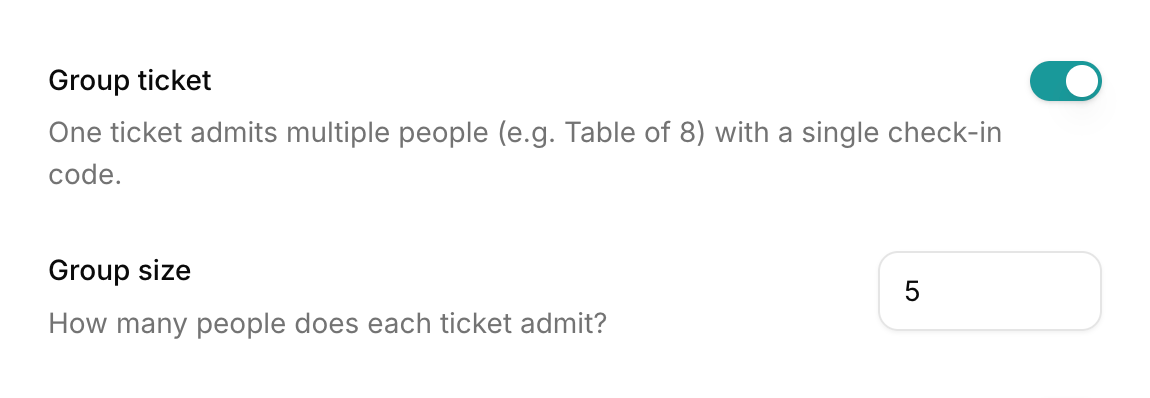
Here's how it works end to end
- For buyers: they purchase one ticket and get one check-in code that covers the whole group. No need to enter details for every single person in the party.
- At checkout: buyers see exactly how many people each ticket admits before they pay, and the order summary reflects the total admissions.
- At the door: when a group arrives, your check-in team scans the code and chooses how many people to admit right then. Half the table shows up early? Admit 4 now, and the remaining 4 can be admitted later on the same code. attndly keeps count so a group can never admit more people than the ticket allows.
Group tickets work with everything else you already use: sales periods, capacity limits, and email delivery.
Smarter ticket availability, no more overselling
We've tightened up how ticket availability is enforced at checkout. Capacity limits, sales windows, and sold-out states are now checked right at the moment of payment, not just when the page loads. If a ticket sells out while someone is mid-checkout, they'll know before their card is charged.
Payout checks that protect everyone
Paid tickets and donations now require a payout account to be set up before they can go live. It's a small step for organizers, but it guarantees that every payment collected has somewhere to land, and that attendees are never charged for an event that can't receive funds.
If you're selling free tickets, nothing changes. If you're monetizing your event, just connect your payout account once and you're set.
What's next
We're just getting started. If there's something you'd love to see on attndly, reply and tell us, we read everything.
Ready to put group tickets to work? Head to your event dashboard, open your tickets, and flip the switch.